TLDR
In the era of Agentic AI, the complexity of system architecture has outpaced traditional documentation. XV Visual Topical Representations serves as the definitive framework for mapping these complexities using standardized visual grammars like Mermaid.js. By transitioning from linear "Retrieve-and-Read" models to multi-dimensional RAG (Retrieval-Augmented Generation) topologies, engineers can better manage data flow, optimize latency, and conduct rigorous Comparing prompt variants (A). This overview synthesizes the evolution of AI topologies—from Naive to Agentic—providing a systems-level blueprint for production-grade AI orchestration.
Conceptual Overview
Visual topical representation is not merely about "drawing diagrams"; it is about the formalization of system logic into a spatial and relational syntax. As Large Language Models (LLMs) are integrated into broader software stacks, the "black box" nature of the model must be surrounded by transparent, deterministic, and visualizable scaffolding.
The Visual Grammar of AI Systems
To represent a modern AI system, we utilize a specific visual grammar, often rendered via Mermaid.js. This approach allows for "Diagrams as Code," ensuring that the visual representation evolves alongside the codebase.
- Nodes (Functional Units): These represent discrete operations such as embedding generation, vector database querying, or LLM inference.
- Edges (Data Vectors): These represent the movement of information, whether it be high-dimensional tensors, raw text, or structured JSON metadata.
- Subgraphs (Process Boundaries): These group related operations, such as the distinction between the Indexing Pipeline (asynchronous) and the Retrieval Pipeline (synchronous).
The Shift from Linear to Topological
Early AI implementations followed a "Naive" linear path. However, production requirements for accuracy and relevance have forced a shift toward complex topologies. A "topology" in this context refers to the arrangement of components and the specific logic gates that govern data movement. This includes feedback loops, where an LLM might critique its own retrieval results and trigger a secondary, refined search.
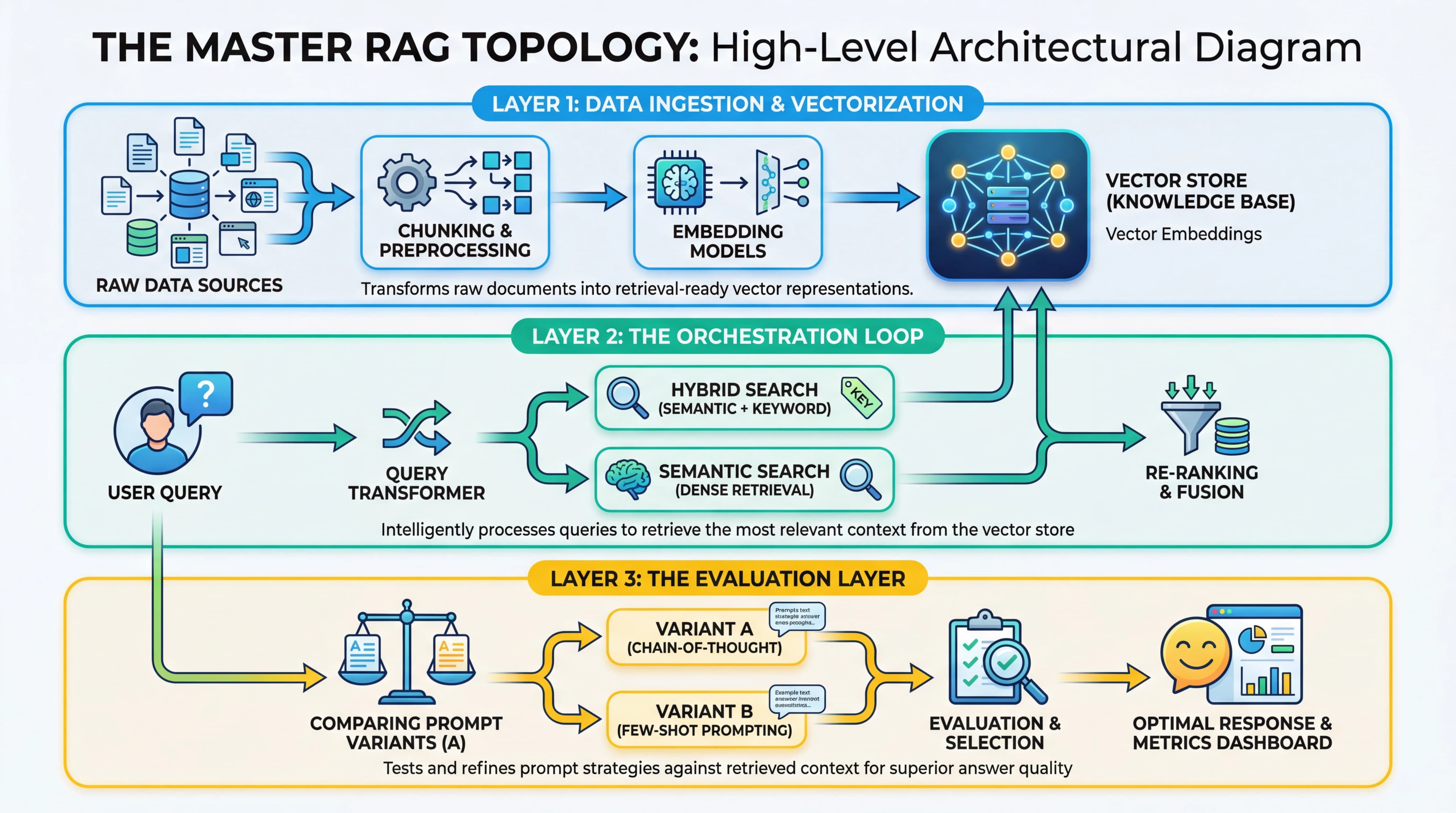 The Master RAG Topology: Architectural Layers and Workflow
Infographic Description: A high-level architectural diagram showing three distinct layers. Layer 1 (Data Ingestion) shows raw data flowing through chunking and embedding nodes into a Vector Store. Layer 2 (The Orchestration Loop) shows a user query entering a "Query Transformer" node, which branches into multiple retrieval paths. Layer 3 (The Evaluation Layer) shows the "Comparing prompt variants" (A) node, where different prompt strategies are tested against the retrieved context before the final generation node.
The Master RAG Topology: Architectural Layers and Workflow
Infographic Description: A high-level architectural diagram showing three distinct layers. Layer 1 (Data Ingestion) shows raw data flowing through chunking and embedding nodes into a Vector Store. Layer 2 (The Orchestration Loop) shows a user query entering a "Query Transformer" node, which branches into multiple retrieval paths. Layer 3 (The Evaluation Layer) shows the "Comparing prompt variants" (A) node, where different prompt strategies are tested against the retrieved context before the final generation node.
Practical Implementations
Implementing visual representations requires a transition through three evolutionary stages of RAG topology.
1. Naive RAG: The Linear Baseline
The simplest topology is a straight line: User Query -> Embedding -> Vector Search -> Context Injection -> LLM -> Response. While easy to visualize, this topology is fragile. It suffers from "Lost in the Middle" phenomena and low precision when the vector space is crowded.
2. Advanced RAG: Pre and Post-Processing
Advanced topologies introduce "Pre-retrieval" and "Post-retrieval" subgraphs.
- Pre-retrieval: Includes query expansion (generating multiple versions of a query) and hypothetical document embeddings (HyDE).
- Post-retrieval: Includes re-ranking nodes (e.g., Cohere Rerank) that filter the top-k results based on semantic relevance rather than just vector distance.
3. Agentic RAG: The Non-Linear Loop
The most sophisticated topology is Agentic. Here, the LLM acts as a router or a controller. Using Mermaid.js, this is represented with decision diamonds ({}). The agent evaluates: "Is the retrieved information sufficient?" If No, the flow loops back to a "Query Rewriter" node. If Yes, it proceeds to generation.
Advanced Techniques
A critical component of optimizing these topologies is the systematic Comparing prompt variants (A). In a visual representation, this is often modeled as a parallel processing node or a "Champion-Challenger" subgraph.
Visualizing Prompt Variant Comparison
When architecting a system, one must decide which prompt structure yields the best grounding. By visualizing this as a node in the topology, developers can:
- Track Performance: Map specific prompt variants to retrieval accuracy metrics.
- Dynamic Routing: Use a "Router" node to send queries to different prompt templates based on the detected intent of the user.
- A/B Testing: Visually represent the split-testing of "Chain-of-Thought" prompts versus "Few-Shot" prompts within the generation phase.
Handling High-Dimensional State
In Agentic topologies, the "State" of the conversation must be visualized as a persistent node that interacts with every other part of the system. This "State Machine" approach ensures that the visual representation accounts for memory, user preferences, and previous retrieval steps, preventing the model from hallucinating or repeating failed search strategies.
Research and Future Directions
The future of visual topical representations lies in Dynamic Topology Generation and GraphRAG.
GraphRAG and Knowledge Graphs
While vector databases rely on proximity, Knowledge Graphs (KG) rely on relationships. Future topologies will show a hybrid approach where a query simultaneously traverses a vector space and a graph structure. Visualizing this requires 3D topological maps or multi-layered Mermaid subgraphs that show how "Entities" and "Relationships" are extracted and merged with vector context.
Self-Documenting Architectures
We are moving toward systems where the AI itself generates its own Mermaid diagrams based on its execution trace. This "Observability-as-Visualization" allows developers to see the actual path a specific query took through a complex agentic web, making debugging and optimization significantly faster.
Topological Optimization
Research is currently focused on "Pruning" topologies. Just as neural networks are pruned for efficiency, AI system architectures can be pruned by identifying redundant nodes in the visual map—such as unnecessary re-ranking steps or over-complicated query transformations—that contribute to latency without improving F1 scores.
Frequently Asked Questions
Q: Why use Mermaid.js instead of standard GUI-based diagramming tools?
Mermaid.js allows for "Diagrams as Code." This means the topology is stored in version control (Git), can be generated programmatically, and stays in sync with the actual implementation. GUI tools often lead to "Documentation Rot," where the diagram reflects an outdated version of the system.
Q: How does "Comparing prompt variants" (A) impact the latency of a RAG topology?
Comparing variants during the development phase (offline) has no impact on production latency. However, if implemented as a "Champion-Challenger" model in production (online), it can double the inference cost and latency. Visualizing this helps architects decide whether to use a "Router" to select the best prompt before inference or to run parallel paths.
Q: What is the "Lost in the Middle" problem in RAG topologies?
This refers to the tendency of LLMs to ignore context placed in the middle of a long prompt, favoring the beginning and the end. Visualizing the "Context Injection" node helps engineers implement "Long Context Reordering" strategies to ensure the most relevant data is placed in the model's high-attention zones.
Q: Can Mermaid.js handle the complexity of multi-agent loops?
Yes, using subgraph and click events. You can represent each agent as a subgraph and use edges to show the "handoff" of state between agents. For extremely complex systems, we recommend a "Nested Topology" where a high-level diagram links to detailed sub-diagrams for each agent.
Q: How do I visualize the "Confidence Score" of a retrieval step?
In a Mermaid diagram, this is typically represented as a conditional branch. After the "Retrieval" node, a "Threshold Check" node evaluates the confidence score. If the score is below a certain epsilon, the topology directs the flow to a "Web Search" fallback or asks the user for clarification.
References
- src:001